Multiplication Calculator
Multiply integers and decimals online — get the full long-multiplication solution with carries, partial products, and a clearly placed decimal point.
Multiplication Calculator
What Is a Multiplication Calculator?
A multiplication calculator finds the product of two or more numbers. This tool goes beyond a simple answer: it shows the complete long-multiplication work, including every partial product, every carry, and (for decimals) where the decimal point belongs in the final answer. It accepts up to 10 factors at once, supports negative numbers, and uses arbitrary-precision arithmetic so the result is exact even for very large inputs.
How to Use the Calculator
- Select the number of factors (2 to 10) from the dropdown.
- Enter each value in the factor input boxes. Decimals and negative numbers are allowed.
- Click Calculate.
- Review the final product at the top and the step-by-step working below it.
How Multiplication Works (The Principle)
Multiplication is repeated addition. For example:
20 × 5
= 20 + 20 + 20 + 20 + 20
= 100
For larger numbers, repeatedly adding becomes impractical, so we use long multiplication (also called the column or standard algorithm). It breaks the problem into smaller single-digit multiplications, shifts each partial product into its correct place value, and adds them.
Method 1 — Long Multiplication of Integers
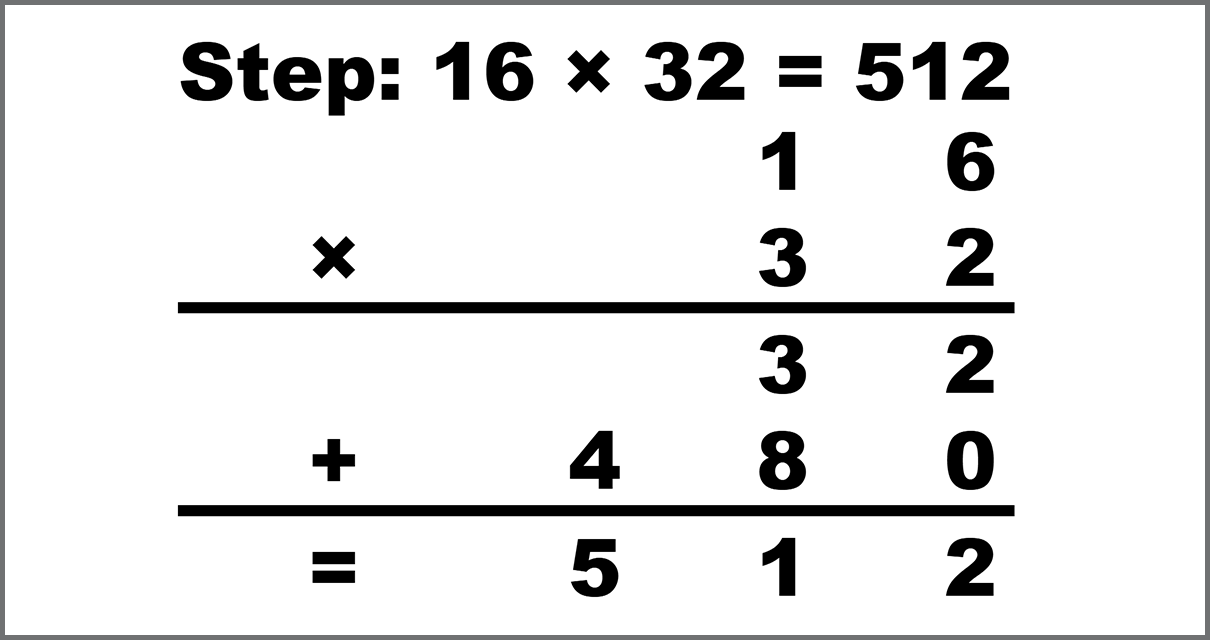
Worked example: 16 × 32
- Multiply 16 by the ones digit of 32 (which is 2): 16 × 2 = 32.
- Multiply 16 by the tens digit of 32 (which is 3), then shift one place left: 16 × 30 = 480.
- Add the partial products: 32 + 480 = 512.
   1 6
x  3 2
-------
   3 2    ← 16 x 2
 4 8 0    ← 16 x 30
-------
 5 1 2   ← final product
So 16 × 32 = 512.
Method 2 — Multiplying Decimals
Worked example: 0.13 × 0.25
- Ignore the decimal points and multiply the numbers as integers: 13 × 25 = 325.
- Count the total number of digits after the decimal point in both factors: 0.13 has 2 decimal places, 0.25 has 2 decimal places → 2 + 2 = 4.
- Place the decimal point in the result so that the answer has 4 decimal places: 325 → 0.0325.
So 0.13 × 0.25 = 0.0325.
Another quick example: 0.2 × 0.5 → ignore decimals → 2 × 5 = 10 → total 2 decimal places → 0.10 = 0.1.
Method 3 — Multiplying Negative Numbers
- negative × positive = negative
- negative × negative = positive
- An even number of negative factors → positive product
- An odd number of negative factors → negative product
Properties of Multiplication
- Commutative: a × b = b × a
- Associative: (a × b) × c = a × (b × c)
- Distributive: a × (b + c) = a × b + a × c
- Identity: a × 1 = a
- Zero: a × 0 = 0
Multiplication Table (1–10)
Use this multiplication table as a quick reference for products from 1×1 up to 10×10.
| × | 1 | 2 | 3 | 4 | 5 | 6 | 7 | 8 | 9 | 10 |
|---|---|---|---|---|---|---|---|---|---|---|
| 1 | 1 | 2 | 3 | 4 | 5 | 6 | 7 | 8 | 9 | 10 |
| 2 | 2 | 4 | 6 | 8 | 10 | 12 | 14 | 16 | 18 | 20 |
| 3 | 3 | 6 | 9 | 12 | 15 | 18 | 21 | 24 | 27 | 30 |
| 4 | 4 | 8 | 12 | 16 | 20 | 24 | 28 | 32 | 36 | 40 |
| 5 | 5 | 10 | 15 | 20 | 25 | 30 | 35 | 40 | 45 | 50 |
| 6 | 6 | 12 | 18 | 24 | 30 | 36 | 42 | 48 | 54 | 60 |
| 7 | 7 | 14 | 21 | 28 | 35 | 42 | 49 | 56 | 63 | 70 |
| 8 | 8 | 16 | 24 | 32 | 40 | 48 | 56 | 64 | 72 | 80 |
| 9 | 9 | 18 | 27 | 36 | 45 | 54 | 63 | 72 | 81 | 90 |
| 10 | 10 | 20 | 30 | 40 | 50 | 60 | 70 | 80 | 90 | 100 |
FAQs
Why does the calculator strip trailing zeros from decimal answers?
Trailing zeros after the decimal point do not change a number's value. For example, 0.10 and 0.1 are mathematically identical, so the cleaner form is shown.
Can it handle very large numbers?
Yes. The calculator uses JavaScript's BigInt for exact integer arithmetic, so results are precise even for numbers with hundreds of digits.
Is this useful for homework?
Yes. Because every partial product, carry, and decimal-point placement is displayed, students can verify each step of their own work rather than only checking the final answer.
References
- U.S. Department of Education — Institute of Education Sciences: Developing Effective Fractions Instruction for Kindergarten Through 8th Grade (covers multiplication of whole numbers, fractions, and decimals).
- National Institute of Standards and Technology (NIST): SI Units and Numerical Notation .
- NASA — Glenn Research Center: Multiplication Basics for Students .
Write Reply to This Calculator