Hex Calculator
It supports hex addition, subtraction, multiplication, division, hex to decimal, decimal to hex, and hex to binary conversions.
Hexadecimal Calculator
Hexadecimal to Decimal
Decimal to Hexadecimal
Hexadecimal to Binary
Hex Bitwise Calculator
Hex, Decimal, and Binary Conversion Table
Hex is popular because each hexadecimal digit maps cleanly to 4 binary bits. That makes it much easier to read long binary values without losing the bit-level meaning.
| Hex | 0 | 1 | 2 | 3 | 4 | 5 | 6 | 7 | 8 | 9 | A | B | C | D | E | F | 10 |
|---|---|---|---|---|---|---|---|---|---|---|---|---|---|---|---|---|---|
| Decimal | 0 | 1 | 2 | 3 | 4 | 5 | 6 | 7 | 8 | 9 | 10 | 11 | 12 | 13 | 14 | 15 | 16 |
| Binary | 0000 | 0001 | 0010 | 0011 | 0100 | 0101 | 0110 | 0111 | 1000 | 1001 | 1010 | 1011 | 1100 | 1101 | 1110 | 1111 | 10000 |
How Hex Arithmetic Works in Real Debugging
Hex math looks strange until you connect it to real work: memory addresses, color channels, register flags, packet bytes, checksums, file offsets, and firmware tables. The rules are the same as decimal arithmetic, but every column rolls over at 16 instead of 10.
Hex Addition: Adding Offsets Without Losing Your Place
Hex addition is what you use when a datasheet says a register block starts at 0x40000000 and the field you need is at offset 0x24. Add them and you get the final address: 0x40000024.
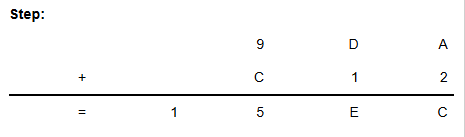
Work from right to left. If a column reaches 16 or more, carry 1 to the next hex column. For example: 0x9DA + 0xC12 = 0x15EC.
Hex Subtraction: Finding the Distance Between Two Addresses
Hex subtraction is useful when you want to know how far apart two addresses are. If a buffer starts at 0x20001000 and a pointer is currently at 0x20001238, the offset is 0x238.
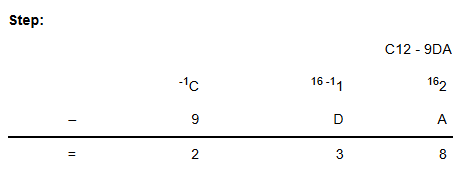
Subtract from right to left. If the upper digit is smaller than the lower digit, borrow 1 from the next column. In hex, that borrowed 1 is worth 16 in the current column. For example: 0xC12 - 0x9DA = 0x238.
Hex Multiplication: Scaling Byte Counts and Data Blocks
Hex multiplication shows up when you calculate memory layouts. If each record is 0x20 bytes and you have 0x18 records, the total size is 0x300 bytes.
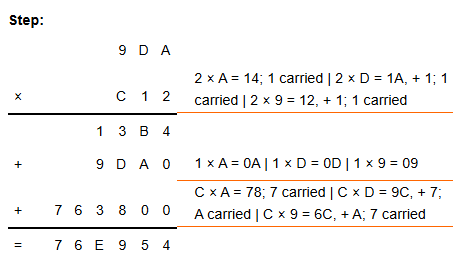
Multiply each digit like long multiplication, shift each partial product left by one hex position, then add the partial products. For example: 0x9DA × 0xC12 = 0x76E954.
Hex Division: Splitting Address Ranges and Buffer Sizes
Hex division helps when you need to split a memory region into blocks. If a region has 0x1000 bytes and each block is 0x100 bytes, you have 0x10 blocks.
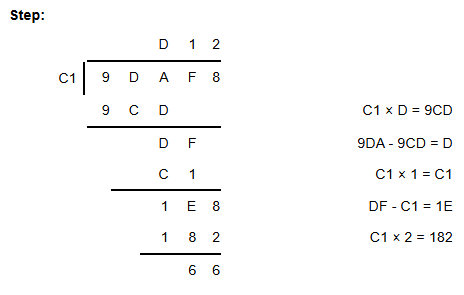
Divide the same way you would in decimal, but compare and subtract in base 16. For example: 0x9DAF8 ÷ 0xC1 = 0xD12 remainder 0x66.
Real-world Use Cases for Hexadecimal in Programming
Hex is not just a number format from computer science class. It is the compact language developers use when values map directly to bytes, nibbles, flags, channels, addresses, and machine-level data.
Use Case 1: How to Add Hex Codes for Colors
Web colors use RGB hex format: #RRGGBB. Each color channel uses one byte, from 00 to FF. For example, white is #FFFFFF, blue is #0000FF, and yellow is #FFFF00.
A common color operation is channel subtraction. If you remove the blue channel from white, you get yellow:
#FFFFFF
- #0000FF
= #FFFF00
In RGB terms, that means:
| Channel | Calculation | Result |
|---|---|---|
| Red | FF - 00 | FF |
| Green | FF - 00 | FF |
| Blue | FF - FF | 00 |
This is why #FFFFFF - #0000FF = #FFFF00. If you are searching for how to add hex codes for colors, the key is to treat the color as three separate 8-bit channels, not one ordinary decimal number.
Use Case 2: Hex Address Calculation in Firmware
Embedded developers often read memory maps written entirely in hex. Suppose a peripheral base address is 0x40020000, and the register offset is 0x14. The register address is:
0x40020000 + 0x14 = 0x40020014
Now suppose an array of sensor records starts at 0x08004000. Each record is 0x20 bytes. To find record index 0x0A:
record_address = base + index × record_size
record_address = 0x08004000 + 0x0A × 0x20
record_address = 0x08004000 + 0x140
record_address = 0x08004140
This is the typical hex address calculation firmware workflow: base address, offset, stride, final address. It is simple, but getting one digit wrong can send your code to the wrong register or flash page.
Use Case 3: File Offsets and Binary Patching
Hex editors show file positions as hexadecimal offsets. If a structure starts at 0x1A0 and the field you want is 0x2C bytes into that structure, the field location is:
0x1A0 + 0x2C = 0x1CC
This kind of calculation is common when reading binary file formats, patching assets, checking packet dumps, or comparing two offsets in a debugger.
Use Case 4: Permissions, Flags, and Bit Masks
Many systems pack several on/off settings into a single number. For example, a permission byte might use one bit for read, one bit for write, and one bit for execute.
| Flag | Binary | Hex |
|---|---|---|
| Read | 00000001 | 0x01 |
| Write | 00000010 | 0x02 |
| Execute | 00000100 | 0x04 |
To combine read and write permissions, use OR:
0x01 | 0x02 = 0x03
To check whether write permission is enabled, use AND:
0x03 & 0x02 = 0x02
Bitwise Operations for Hex Values
Regular arithmetic answers questions like "how much?" Bitwise operations answer questions like "which bits are on?" That is why programmers often need AND, OR, XOR, NOT, and shifts more than normal multiplication or division.
| Operation | Use it for | Example |
|---|---|---|
| AND | Check whether specific bits are enabled | 0xF0 & 0x0F = 0x00 |
| OR | Turn on specific bits | 0x80 | 0x01 = 0x81 |
| XOR | Toggle bits or compare differences | 0xAA ^ 0xFF = 0x55 |
| NOT | Invert bits within a fixed width | ~0x0F in 8-bit = 0xF0 |
| Shift Left | Move bits left, often equivalent to multiplying by powers of 2 | 0x04 << 2 = 0x10 |
| Shift Right | Move bits right, often equivalent to dividing by powers of 2 | 0x80 >> 4 = 0x08 |
Hexadecimal to Decimal Conversion Formula
To convert hex to decimal, multiply each digit by its power of 16 and add the results.
Decimal value = Σ(hex digit × 16position)
Example:
CBA = C × 16² + B × 16¹ + A × 16⁰
CBA = 12 × 256 + 11 × 16 + 10
CBA = 3258

Decimal to Hexadecimal Conversion Method
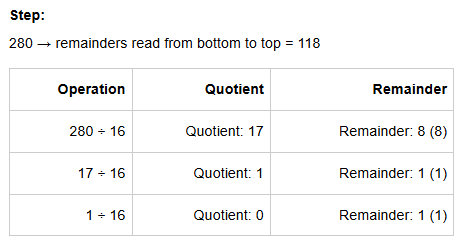
Divide the decimal number by 16 repeatedly, keep each remainder, then read the remainders from bottom to top.
280 ÷ 16 = 17 remainder 8
17 ÷ 16 = 1 remainder 1
1 ÷ 16 = 0 remainder 1

280 decimal = 118 hex
Hexadecimal to Binary Conversion
Each hex digit maps to 4 binary bits. That is why converting hex to binary is mostly a lookup operation.
A = 1010
1 = 0001
2 = 0010

A12 hex = 101000010010 binary

Expert FAQ
Why does my hex subtraction look different with big-endian and little-endian data?
The arithmetic result does not change because of endian format. What changes is how bytes are ordered in memory. If you read the bytes in the wrong order, you are subtracting a different number.
For example, the two bytes 12 34 mean 0x1234 in big-endian, but 0x3412 in little-endian. If your subtraction result looks wrong, first confirm whether the byte sequence has been interpreted in the correct endian order.
How do I handle signed hex numbers and overflow?
Decide the bit width first. Hex values do not automatically tell you whether they are signed or unsigned. In an 8-bit signed value, 0xFF usually means -1 using two's complement. In an unsigned 8-bit value, 0xFF means 255.
Overflow also depends on width. For 8-bit arithmetic:
0xFF + 0x01 = 0x00 with carry out
The full mathematical result is 0x100, but an 8-bit register keeps only the lowest 8 bits, so the stored result becomes 0x00.
Why does NOT produce a huge value in some programming languages?
NOT needs a fixed bit width to be intuitive. In 8-bit arithmetic, ~0x0F = 0xF0. In 16-bit arithmetic, ~0x000F = 0xFFF0. In 32-bit arithmetic, ~0x0000000F = 0xFFFFFFF0.
If your language uses signed integers internally, the displayed result may look negative. Mask the result to the width you actually want:
result = (~value) & 0xFF
What is the safest way to compare two hex values from a debugger?
Normalize them first. Remove prefixes like 0x, confirm the width, confirm endian order, and decide whether the value is signed or unsigned. A lot of "wrong" hex math is really a parsing problem.
When should I use hex instead of decimal?
Use hex when the value maps naturally to bytes or bits: memory addresses, color codes, machine instructions, bit flags, Unicode code points, packet dumps, file offsets, and embedded registers. Use decimal when the value represents ordinary human-scale counting, such as prices, ages, distances, or quantities.
Long-tail Hex Calculator Topics
These examples are included because they match common developer searches and real debugging tasks:
- how to add hex codes for colors: Treat RGB values as three separate channels, then add or subtract each channel.
- hex address calculation firmware: Add base addresses, offsets, and structure sizes when working with memory maps.
- hex memory offset calculator: Subtract two addresses to find the distance between them.
- bitwise hex calculator for masks: Use AND, OR, XOR, and NOT to inspect or modify individual bits.
- hex register value calculator: Combine register flags and decode embedded configuration values.
- hex color subtraction calculator: Remove or compare RGB channels using hexadecimal arithmetic.
Hexadecimal Multiplication Table
| x | 1 | 2 | 3 | 4 | 5 | 6 | 7 | 8 | 9 | A | B | C | D | E | F | 10 |
|---|---|---|---|---|---|---|---|---|---|---|---|---|---|---|---|---|
| 1 | 1 | 2 | 3 | 4 | 5 | 6 | 7 | 8 | 9 | A | B | C | D | E | F | 10 |
| 2 | 2 | 4 | 6 | 8 | A | C | E | 10 | 12 | 14 | 16 | 18 | 1A | 1C | 1E | 20 |
| 3 | 3 | 6 | 9 | C | F | 12 | 15 | 18 | 1B | 1E | 21 | 24 | 27 | 2A | 2D | 30 |
| 4 | 4 | 8 | C | 10 | 14 | 18 | 1C | 20 | 24 | 28 | 2C | 30 | 34 | 38 | 3C | 40 |
| 5 | 5 | A | F | 14 | 19 | 1E | 23 | 28 | 2D | 32 | 37 | 3C | 41 | 46 | 4B | 50 |
| 6 | 6 | C | 12 | 18 | 1E | 24 | 2A | 30 | 36 | 3C | 42 | 48 | 4E | 54 | 5A | 60 |
| 7 | 7 | E | 15 | 1C | 23 | 2A | 31 | 38 | 3F | 46 | 4D | 54 | 5B | 62 | 69 | 70 |
| 8 | 8 | 10 | 18 | 20 | 28 | 30 | 38 | 40 | 48 | 50 | 58 | 60 | 68 | 70 | 78 | 80 |
| 9 | 9 | 12 | 1B | 24 | 2D | 36 | 3F | 48 | 51 | 5A | 63 | 6C | 75 | 7E | 87 | 90 |
| A | A | 14 | 1E | 28 | 32 | 3C | 46 | 50 | 5A | 64 | 6E | 78 | 82 | 8C | 96 | A0 |
| B | B | 16 | 21 | 2C | 37 | 42 | 4D | 58 | 63 | 6E | 79 | 84 | 8F | 9A | A5 | B0 |
| C | C | 18 | 24 | 30 | 3C | 48 | 54 | 60 | 6C | 78 | 84 | 90 | 9C | A8 | B4 | C0 |
| D | D | 1A | 27 | 34 | 41 | 4E | 5B | 68 | 75 | 82 | 8F | 9C | A9 | B6 | C3 | D0 |
| E | E | 1C | 2A | 38 | 46 | 54 | 62 | 70 | 7E | 8C | 9A | A8 | B6 | C4 | D2 | E0 |
| F | F | 1E | 2D | 3C | 4B | 5A | 69 | 78 | 87 | 96 | A5 | B4 | C3 | D2 | E1 | F0 |
| 10 | 10 | 20 | 30 | 40 | 50 | 60 | 70 | 80 | 90 | A0 | B0 | C0 | D0 | E0 | F0 | 100 |
Write Reply to This Calculator