Biweekly Payment Calculator
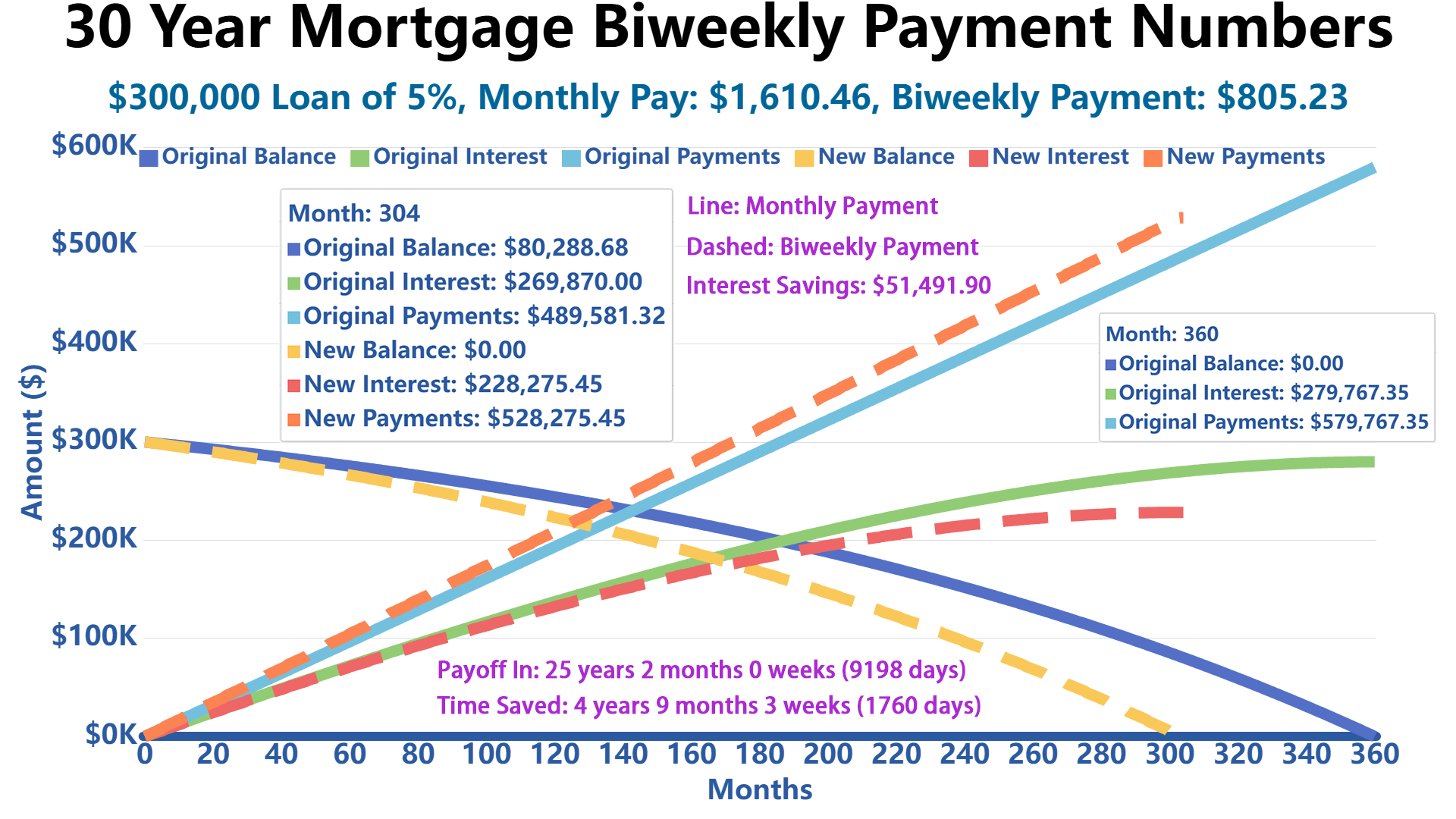
This biweekly payment calculator compares your original monthly loan schedule against three accelerated payoff strategies: true biweekly payments, semi-annual extra payments, and one annual extra payment.
Biweekly Payment Calculator
Calculation Results
Original Schedule
Payment Visualization Comparison
Amortization Schedule
| Monthly Payments Schedule | Biweekly Payments Schedule | ||||||||
|---|---|---|---|---|---|---|---|---|---|
| Month | Date | Interest | Principal | Payment | End Balance | Interest | Principal | Payment | End Balance |
Three Biweekly Payment Strategies
1. True Biweekly Payment (26 Payments Per Year)
With this strategy, you make a payment every two weeks instead of once a month. Since there are 52 weeks in a year, you'll make 26 half-payments, which equals 13 full monthly payments annually instead of 12. This extra payment goes directly toward your principal balance.
How it works: Your monthly payment is divided by 2, and you pay that amount every 14 days. Over the course of a year, you naturally make one extra full payment.
Best for: Borrowers who get paid biweekly and want to align their loan payments with their paycheck schedule.
2. Half-Year Extra Payment (Semi-Annual)
This method involves making your regular monthly payments plus an additional half payment every six months (typically in June and December). You make 12 regular monthly payments plus 2 half-payments per year, totaling 13 full payments annually.
How it works: Continue your normal monthly payment schedule, but twice a year, add an extra payment equal to half your regular monthly amount.
Best for: Borrowers who receive bonuses, tax refunds, or have seasonal income fluctuations and prefer scheduled extra payments.
3. Annual Extra Payment
With this approach, you make 12 regular monthly payments plus one additional full payment once per year. This results in 13 full payments annually, identical in total to the other methods but concentrated in a single extra payment.
How it works: Make your regular monthly payment throughout the year, then make one additional full payment at a predetermined time (often when you receive a year-end bonus or tax refund).
Best for: Borrowers who receive annual bonuses or prefer to make one larger extra payment rather than multiple smaller ones.
Important Note: All three strategies result in making 13 full payments per year instead of 12, but they differ in timing and payment frequency. The true biweekly method typically saves slightly more interest because payments are applied to the principal more frequently throughout the year.
Biweekly Strategy Comparison
| Strategy | Payment Pattern | Main Advantage | Watch Out For |
|---|---|---|---|
| True Biweekly | One payment every 14 days, usually 26 payments per year. | Best timing advantage because principal is reduced more frequently. | May not align well with semi-monthly paychecks. |
| Half-Year Extra | Regular monthly payments plus one half-payment every six months. | Good for people with semi-annual bonuses or seasonal cash flow. | Requires planning for the two larger payment months. |
| Annual Extra | Regular monthly payments plus one full extra payment per year. | Simple and easy to manage if you receive an annual bonus or tax refund. | Slightly less timing benefit than spreading extra principal throughout the year. |
The Fine Print Gotchas: What Many Biweekly Payment Programs Do Not Advertise
Biweekly payments can be a smart way to pay down a mortgage or loan faster, but not every “biweekly payment program” is free or even necessary. Before you enroll in a third-party plan, read the fine print carefully.
1. Setup Fees Can Eat Into Your Savings
Some third-party biweekly payment services charge a one-time setup fee, often around $200 to $300. That fee may sound small compared with a mortgage balance, but it directly reduces the value of your interest savings.
Real-world tip: If your expected first-year interest savings are only a few hundred dollars, a setup fee could wipe out most of the benefit at the beginning.
2. Per-Payment Processing Fees Add Up Quietly
Some programs also charge a small fee every time they withdraw a payment. For example, a $2 to $5 processing fee may not feel like much, but with 26 biweekly payments per year, that can become $52 to $130 annually.
Before enrolling, ask: “Is there any fee per debit, per transaction, per draft, or per payment?” These fees may be described in different ways.
3. Your Servicer May Not Apply Payments Immediately
A true biweekly strategy only works best when each payment is applied to your loan balance when it is received. Some third-party services collect your biweekly payments, hold them in an account, and then send one monthly payment to your lender.
If that happens, you may not get the full interest-saving benefit of true biweekly payments because your principal balance is not being reduced every 14 days.
4. Extra Payments Must Go Toward Principal
When making extra payments, make sure the additional amount is applied to principal, not treated as an early regular payment or placed in suspense. If the extra money is not applied correctly, your payoff timeline may not improve as expected.
Best practice: Look for a payment option labeled “principal-only payment,” “additional principal,” or “extra principal.” If you are not sure, call your loan servicer and confirm how extra payments are handled.
5. You Can Often Do It Yourself for Free
Many borrowers do not need a paid biweekly program. You may be able to create a similar result by making one extra monthly payment per year, adding one-twelfth of your monthly payment to each regular payment, or making scheduled principal-only payments when your budget allows.
The big-bank fine print: The real savings usually come from paying extra principal, not from the label “biweekly.” The payment timing helps, but the extra principal is what does most of the work.
Paycheck Timing Matters: Biweekly vs. Semi-Monthly Income
One of the most common mistakes borrowers make is assuming that “biweekly” and “twice a month” mean the same thing. They do not.
If your paycheck schedule does not match your loan payment strategy, a biweekly plan can feel harder to manage than expected. Before choosing a strategy, check how you are actually paid.
| Pay Schedule | How It Works | Paychecks Per Year | Best Matching Strategy |
|---|---|---|---|
| Semi-Monthly | You are paid twice per month, often on the 1st and 15th or the 15th and last day. | 24 | Monthly payment with extra principal, Half-Year Extra, or Annual Extra. |
| Biweekly | You are paid every two weeks, often every other Friday. | 26 | True Biweekly payment plan. |
| Weekly | You are paid once per week. | 52 | Weekly budgeting toward biweekly or monthly principal payments. |
| Monthly | You are paid once per month. | 12 | Monthly payment plus scheduled extra principal when possible. |
Quick Paycheck Check
Ask yourself this before choosing a plan: Do you get paid on fixed calendar dates, such as the 1st and 15th, or do you get paid every other Friday?
If you are paid on the 1st and 15th, you are likely paid semi-monthly. That gives you 24 paychecks per year, not 26. A true biweekly loan payment plan may still work, but it will not line up perfectly with every paycheck.
If you are paid every other Friday, you are likely paid biweekly. That gives you 26 paychecks per year. In that case, a true biweekly payment plan often feels more natural because each loan payment can line up with each paycheck.
The Two “Extra Paycheck” Months
If you are paid biweekly, two months each year usually have three paychecks instead of two. Those extra-paycheck months are a great opportunity to make principal-only payments without changing your normal monthly budget.
Practical tip: Instead of enrolling in a paid biweekly program, some borrowers use those two extra paychecks to make lump-sum principal payments. This can create a similar payoff acceleration while keeping more control over the process.
FAQ
Q: Is a biweekly payment plan always worth it?
A: Not always. A biweekly plan can save interest and shorten your payoff time, but the benefit depends on your loan balance, interest rate, remaining term, and whether there are fees. If a company charges a setup fee or per-payment fee, compare those costs against the interest savings before signing up.
Q: What is the biggest mistake people make with biweekly payments?
A: The biggest mistake is assuming that every biweekly program applies payments to principal every two weeks. Some services collect your money every two weeks but only send a regular monthly payment to your lender. In that case, you may not get the full benefit of true biweekly principal reduction.
Q: What should I ask my lender before starting?
A: Ask these questions before enrolling or sending extra money:
- Do you accept true biweekly payments?
- Will each payment be applied when received?
- Can I make principal-only payments online?
- Are there any prepayment penalties?
- Will extra payments reduce principal, or will they be treated as future scheduled payments?
- Are there any setup fees, draft fees, or processing fees?
Q: My lender does not support true biweekly payments. What can I do instead?
A: You can usually get a similar result by using an annual extra payment or monthly extra principal strategy. For example, if your regular monthly payment is $1,200, you could add $100 to each monthly payment. Over 12 months, that equals one extra full payment for the year.
This approach is simple, easy to automate, and often avoids third-party fees. Just make sure the extra $100 is applied to principal.
Q: Is adding one-twelfth of my monthly payment each month the same as biweekly?
A: It is very close, but not exactly the same. True biweekly payments reduce principal every 14 days, so interest can be slightly lower because the balance drops more frequently. Adding one-twelfth of your payment each month still creates one extra full payment per year, which is where most of the savings come from.
Q: I am paid on the 1st and 15th. Should I choose true biweekly?
A: Maybe, but be careful. Being paid on the 1st and 15th means you are probably paid semi-monthly, not biweekly. You receive 24 paychecks per year, while a true biweekly payment plan requires 26 payments per year. That mismatch can create cash-flow stress in some months.
If your income is semi-monthly, you may prefer a monthly extra-principal strategy, half-year extra payment, or annual extra payment.
Q: I am paid every other Friday. Is true biweekly a good fit?
A: It often is. If you receive 26 paychecks per year, true biweekly payments can line up naturally with your income. You are already used to a two-week rhythm, and the two extra-paycheck months can help create the equivalent of an extra annual payment.
Q: Why does true biweekly usually save more interest than annual extra payments?
A: True biweekly payments reduce the loan balance more frequently. Since interest is calculated on the remaining balance, lowering that balance earlier can reduce the total interest paid. Annual extra payments can still work very well, but the extra principal arrives later in the year instead of gradually throughout the year.
Q: Do I need a third-party company to make biweekly payments?
A: Usually, no. Some borrowers use third-party companies for convenience, but many people can achieve similar results directly through their lender by setting up automatic extra principal payments. The key is making sure the extra money goes to principal and that there are no unnecessary fees.
Q: Are there prepayment penalties?
A: Some loans may include prepayment penalties, especially certain older mortgages, private loans, or non-standard financing products. Many modern mortgages do not have them, but you should confirm before making aggressive extra payments. Check your loan documents or call your servicer.
Q: Why does the calculator show $0.00 in some rows of the amortization table?
A: That usually means the loan has already been paid off under the biweekly or extra-payment strategy. The original monthly schedule may still have remaining months, so the table shows $0.00 for the accelerated plan after the balance reaches zero.
Q: Why does “Payoff In” plus “Time Saved” not always look exactly equal to my original loan term?
A: The calculator may round weeks or months for readability. For example, 9 remaining days may display as 1 week, even though there are 2 extra days not shown in the rounded week number. The underlying payoff calculation still uses the full date difference.
Q: Which option should I choose if I want the simplest setup?
A: The simplest option is usually to keep your regular monthly payment and add a fixed extra amount toward principal each month. It is easy to understand, easy to automate, and does not require a special biweekly program. If your lender supports true biweekly payments for free, that can also be a strong option.
References
Our biweekly payment calculator is based on standard amortization formulas and financial principles. For more information about loan payments and mortgage strategies, please refer to these authoritative sources:
- Consumer Financial Protection Bureau - Loan Options
- USA.gov - Mortgages and Home Loans
- Federal Reserve - Consumer Credit
- U.S. Department of Housing and Urban Development - Buying a Home
- Federal Trade Commission - Mortgage Payments
Write Reply to This Calculator